
BOSS: a dependable open source embedded operating system
Sergio Montenegro
FHG
FIRST
www.first.fhg.de/~sergio
BOSS targets a principle which the world forgot a long time ago: Simplicity.
BOSS
was designed as a frame work to be a dependable real time embedded
operating system which can be easily certified by different safety
organs.
Due to the fact, that complexity is the first foe of
safety, BOSS is intended to be as simple as possible, so it is easier
to understand, to review, to use etc. The whole kernel can be printed
in a few pages. Some parts of BOSS are being verified mathematically
and formally using model checker and theorem provers. With the
current state of the art on formal verification, complex systems
cannot be verified formally, but BOSS can be. BOSS is based on very
few and simple basic functions, which can be proofed very faithfully,
and these functions are used for almost every operation of the
kernel. Furthermore BOSS is open-source, allowing total transparency
and internal visibility.
Its characteristics are:
multithreading
pre-emptive
priority management
real time
fault tolerance support
communication support
OO-design and implementation
C++ interface
Time resolution 1 microsecond
Thread switch time: eg. 3 microseconds PPC at 48 Mhz.
Reaction time: under eg. 3 microseconds PPC at 48 MHz
Booting time from flash memory: less than one second
Currently there are 3 implementations of BOSS on different platforms: powerPC, x86, and an on-top-of-LINUX implementation. Applications written on BOSS can run without changes on any of these platforms. The on-top-of-LINUX implementation helps the developer to work locally on his workstation without having to use the target system. To move to the target he has only to recompile the code. The behavior will be the same except for timing requirements and time resolution which on LINUX can not be as exact as in the target systems.
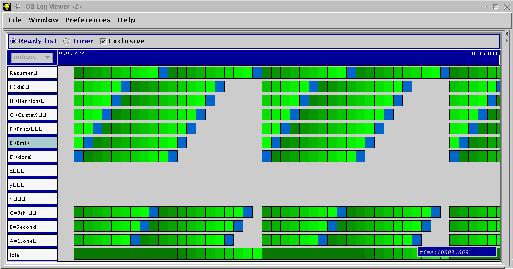
The application development and execution of a simulated system can be done on a LINUX workstation. For the execution on the target system we provide a debugger interface and serial connections to load and debug your system. Using LINUX as front-end to the target system the whole work can be done remotely using internet. It is possible to capture log files of the activities in BOSS in the target system and there are tools to visualize the internal timings of your system.
BOSS is structured in layers from hardware up to the final application, each providing an virtual view from the lower layer. This virtual view is always the same even if the more lower layers are substituted. The bottom layer is the target hardware CPU, IO devices and other Hardware units or a LINUX-platform simulation of the devices. This layer is for the kernel and applications (except speed and timing granularity) transparent and can be changed very easily.
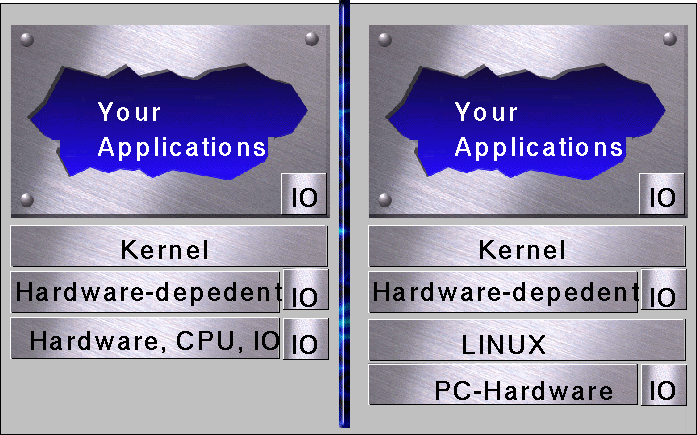
The second layer is the (only) hardware dependent layer. This layer implements the functionality which is different on each platform, e.g. CPU-register load/store, low level Hardware-Drivers and basic interrupt management. To move from one platform to another one only this layer has to be rewritten. A small problem is the IO. The basic IO handling is implemented in the second layer, but there are so many different devices with different and some times very complex protocols. Such complex protocols should be implemented in the application layer. An abstraction which would cover all possible devices would bring a very high complexity and lower flexibility. BOSS provides only a basic support for IO handling, like event propagation.
The third layer is the kernel which implements the interface for the applications. It manages threads and resources; it will be explained later.
The forth layer implements your applications which can do any thing you need!
The Kernel is so simple that it can be totally explained in one page:
The basic class is Thread: it produces executable objects with context, stack and own data. They can run, be suspended, reactivated and react to time, internal and external events.
The basic operations are lists-management. All resources are managed (sorted) in chained lists, therefore there is no limit to their length. No element can be in two lists at the same time. Before inserting an element in any list, it will be removed from any other list. If it is required to have an element in several lists it is possible to use reference entries.
There are two basic operations on any list:
insert: inserts an entry in the proper place according to a sort field. The sort field will be compared and the new entry will be inserted before the first with higher value. e.g. if other entries with the same value are found (e.g. same priority) the new one will be added after these (first come first serve on same priorities).
remove: removes an entry from a list (if already there). Most of the times the remove operation is applied to the first of the list.
Ready list: List of threads which are ready to use CPU time, sorted (inverted) by priorities. The first in the list has currently the CPU -- is running now. All other are waiting. The priority is inverted internally so that the higher priority is first and 0 at the end of the list. If the list is empty the Idle thread gets the control, which consumes all unused CPU time.
Timer list: List of threads which are waiting for a time point (time event), sorted by time. The next Thread to be awaken is at the front of the list.
Semaphores: List of threads sorted by priority. Semaphores are used to implement monitors: to protect exclusive sections and to implement synchronisation. All threads which are waiting to enter an exclusive section are managed in a semaphore list. The thread with the highest priority will get the resources first.
Messages and communication lists: Messages from one thread to other are written in a list sorted by priorities. Usually all messages have the same priority, so that the list works like a fifo. A thread attempting to read from an empty Messagebox will be suspended.
User lists: Applications can use the list-classes to build any kind of list for their own uses.
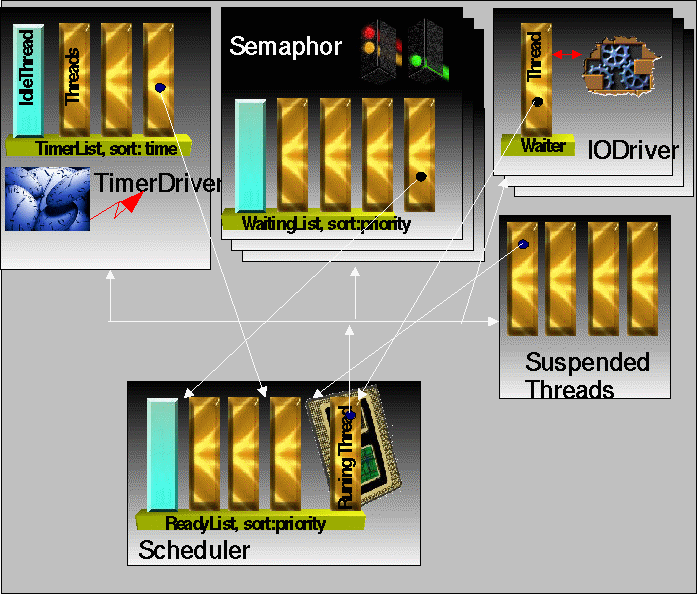
All
Threads operations are implemented just by inserting and removing
threads from lists: start: creates the thread context and inserts the
thread it in the ready list.
suspend: removes the thread from the
ready list
resume: inserts the thread in the ready list
wakeAt:
removes the thread from the ready list and inserts it in the timer
list
The
scheduler manages the ready list and activates the first thread fount
in the list. But a small help is required from the hardware dependent
layer:
transfer(): to save the context of the running thread and
load the context of other thread to give it the CPU control. The
scheduler is pre-emptive. At any time if a Thread (B) with higher
priority than the running thread (A) is resumed, the CPU will be
taken from Thread A and passed to Thread B (Transfer A -> B).
The
TimerDriver manages the hardware time gauge or interrupts and resumes
threads which are waiting for time points.
IO Drivers do the same,
but with IO events/interrupts.
Following classes are not needed for the basic thread management, but they include functions which are required very often, therefore they are supplied here.
For
communication among threads there are two possibilities: 1.
Synchronously using MailBox: the receiver thread will be suspended
until the data arrive. For this kind of communication fifos (messages
lists) and signal-boxes are used.
2. Asynchronously
communication: if no message is ready the receiver is notified and
can do something else or the receiver will get the last written data.
Most of the cases a thread needs only to get the newest status
information of other threads and not the whole history. In this cases
you can use a asynchronous communication buffer.
Some
other useful classes:
pool management
flash-memory & rom
management
logwriter (for timing visualization on the host
computer)
nameserver (to find objects using names)
Timecontrol
(to create loops in time)
Voter (time triggered 2 of 3 voter)
All this classes are thread safe. If you need more than that, you can use the gnu template library, but watch out, they are not thread safe.
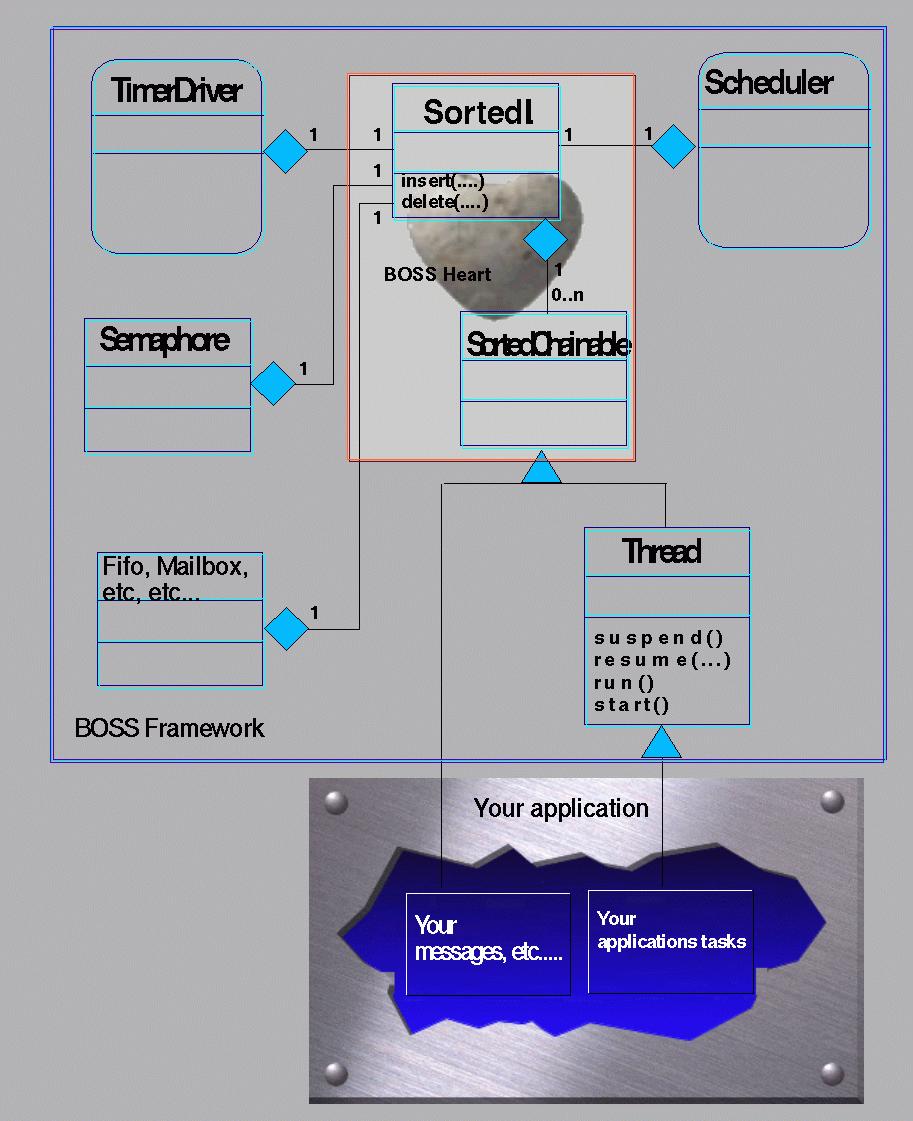
BOSS is build as a frame work which you can adapted to fulfill your requirements. The framework technology is a further step following the object oriented technology where the functionality is provided by OO methods in classes, the user can employ each class as it is, or he can tailor (adapt) the class to his own needs, by means of inheritance and methods/operators overloading.
The framework technology offers complete adaptable structures of classes. A framework is composed of several classes in a structure with different relationships: inheritance, references and contention. The whole structure has a specific functionality. The user can adapt its functionality to his needs as follows: Some classes in the structure provide the adaptation interface for the user. Other classes offer a function interface or support the whole framework function. To adapt the functionality of the framework to his need, the user writes new classes, which inherit from the adaptation interface classes (subclasses). The adaptation interface methods should be overloaded with the user methods and functionality in order to integrate the user functionality into the framework. The new (user) subclasses are integrated automatically (by inheritance) into the structure. The framework functionality is thus extended by the desired functionality and adapted to the user's needs.
The most important adaptation interface class is the "Thread" class in BOSS. With this class the user can implement his tasks with own context and stack. The user should write his desired functionality in a subclass and overload the method "run()" which else does nothing per default. After the thread is started it will be written in the ready list and will run as soon as possible, according to its priority and other ready threads (its position in the list).
The TimerDriver should not be extended, it can be used to resume (reactivate) threads at a determined time point. The EventManager and IODrivers are like the TimeDriver, they resume threads after the expected event arrived, e.g. software events, timer events, external events like interrupts etc.
external
Thread xx;
class TestThread: public
Thread { //
Thread produces an active object
void
run () {
while(1)
{
{.... do something }
yield();
// other thread, same priority will get the
CPU
{.... do something }
suspend();
// not run anymore until someone resumes me
{.... do something }
suspendFor(1000);
// TimerDriver will resume me in 1000 ms.
resume(xx); //
I resume the Thread xx, which I know.
}
}
};
/** Another example: **/
Semaphore
monitor;
class OtherTestThread
: public Thread
{
void run
() {
TimeControl
timeControl; //To implement time loops
timeControl.startAt(5000); // Time point for
the first time
timeControl.every(100); //
Cyclus time
while(1) {
timeControl.wait(); //
wait according to start and cyclus
{.... do something
}
monitor.enter(); //
protected area,
{.... do something }
monitor.leave();
}
}
};
/** Create 6 threads or applications ***/
TestThread
a, b, xx;
OtherTestThread x, y,
z;
To clarify the concepts of BOSS lets look at some examples of its operations.
Lets take two applications A (blue) and B (red). Application A suspends itself, application B knows about it (common data) and after some time (or event) application B resumes application A. This operation is only a call to suspend() and a call to resume(A), but to understand the mechanism all internal steps are explained. (see diagram)
0: Application A starts running
1: Application A calls suspend
2: The thread associated with application A, asks the scheduler to remove it from the ready list.
3: Application B calls resume for thread A
4: Still on the context (and stack) of thread B, thread A passes and asks the scheduler to add A to the ready list.
5: Application A will run again as soon as possible, according to its position in the ready list.

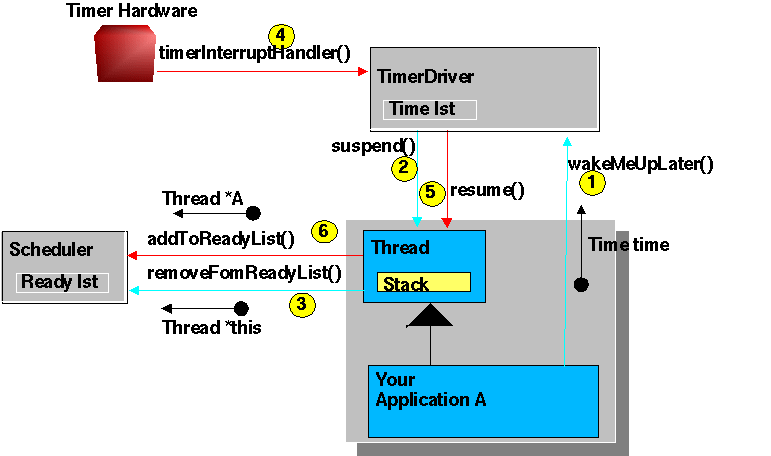
Application A wants to stop running and run again at a determined time point. This operation is only one call (suspendUntil(time)), but to understand the mechanism all internal steps are explained. (see Diagram)
1: Application A asks the TimerDriver to register A in the timerlist (time is given)
2,3: The TimerDriver (still on the stack of application A) suspends Thread A
4: Some time later the TimerDriver will be activated by a hardware timer interrupt
5,6: TimerDriver resumes thread A.
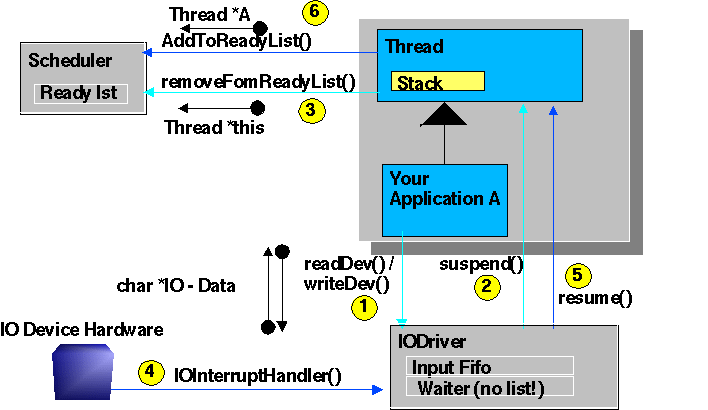
Application A wants to read data from a Device, where the Data have not yet arrived, the application will be suspended until the data are available. This Operation is only one call to an IODriver::read(..) (See diagram)
1: Application A calls read()
2,3: if the data are not ready, the IODriver registers a reference to A and suspends it.
4: The hardware signals the arrival of data
5,6: The IODrivers resumes the Thread with the registered reference (Pointer to A)
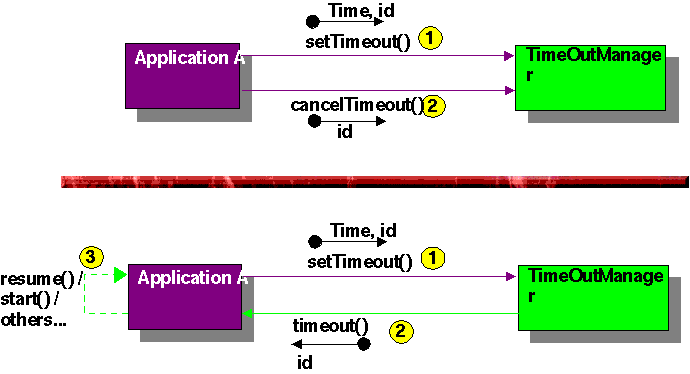
See diagram
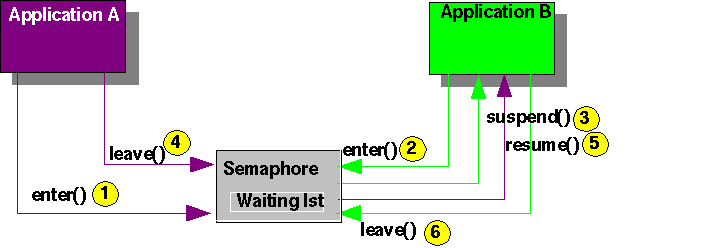
1: Application A passes the Semaphore, which is free, the semaphore is now occupied
2,3: Application B wants to pass the occupied semaphore, the semaphore inserts a reference to B in an internal waiting list and suspends it
4,5: Application A leaves the semaphore, the semaphore checks whether someone is waiting in its list or not, and resumes the first one (heights priority or longer waiting): Thread B.
6: Application B leaves the Semaphore, no one is waiting.
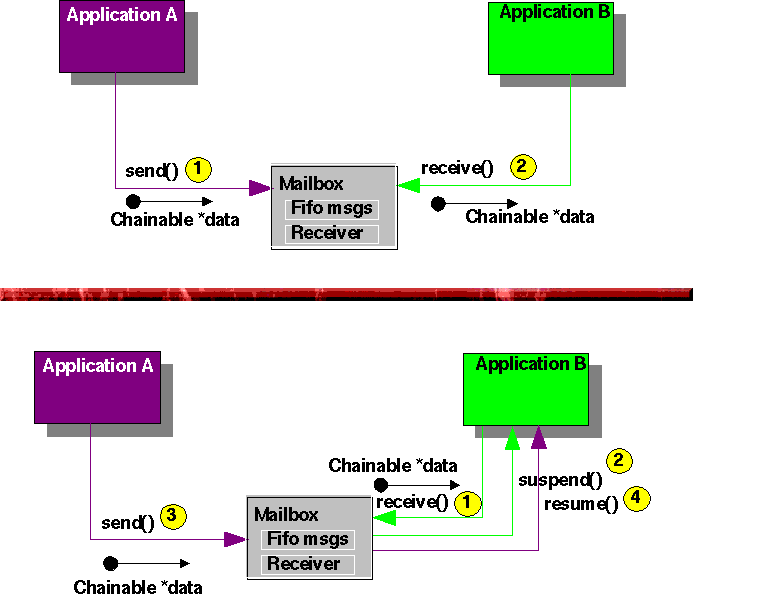
Favorable case: when the receiver wants the data, the sender has send them already.
1: Application A sends data, the Mailbox registers the data in a chained list (Fifo)
2: Application B reads the data, the Mailbox takes the first data from fifo and passes them to B
Unfavorable
case: when the receiver wants the data, but there are no data there.
1,2: Application B reads data, no data are there, the Mailbox stores a reference to B and suspends it
3,4: Application A sends data, the Mailbox resumes the suspended Thread B and passes the data to B
Sometimes it is not required or not wanted to suspend and resume threads for communication/synchronization among threads. You can (but should not) pool on the Mailboxes, Semaphores, IODrivers etc, but if you want so, use better asynchronous mechanisms like AsyncComBuf, where you will get, each time you read, the newest written data. You can use a Fifo (chained list) too, to register and pass messages without flow control,
Such objects can be used from both sides asynchronously (Thread safe)


The threads can be synchronized among them by using semaphores, suspends, resumes and THREAD_ATOMAR constructs. But Hardware interrupts can occur at any time. It is possible to lock/disable interrupts, but this should be avoid.Normally the interrupts are allowed at any time to ensure the fastest interrupt reaction.
To avoid problems and data inconstancies when interrupts occurs, the system is divides in two independent work areas (worlds): The threads world, where the applications reside and the interrupt area, which is activated asynchronously from the threads and applications, by hardware events, like timers, i/o devices, alarms etc.
Communication between this two worlds is performed by using extra asynchronous communications buffers and fifos. This elements has two sides: one to write data and one to read data. This elements are implemented in such a manner, that both sides can be used asynchronously from each other. No explicit locks or synchronization is required. To pass complex data from one world to the other such elements are used. They are extra design to couple the interrupt world and the threads world, but they can be used among threads too. Simple data which can be written/read atomic (like an integer or a character), can be used in a manner that one side only writes and the other only reads each of this variable. This is a safe asynchronous communication too.
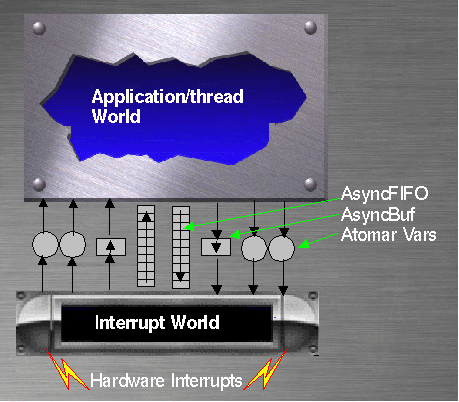
The Thread world will never call or interrupt the interrupt world, which has the highest priority in the system. The thread world can be interrupted at any time by interrupts and after the interrupt execution the interrupt server may "return" (jump) to the dispatcher instead than to the interrupted place if a redispatch is required. The interrupted address will be saved as part of the context of the interrupted thread. The implementation of this jump from the interrupt world to the dispatcher is a critical operation and is hardware dependent...
